


Voxa: Voice Translator & Chat
0.00.00 Reviews
App Specs
- Version
- 1.0.4
- Updated On
- License
- Free
- Downloads
- 50,000+
- Developer
- TRUNG NAM CORPORATION
- Categories
- Travel & Local
- Platform
- Android
Screenshots
 Analysis by AppCompare
When I’m in an unfamiliar place, the hardest part of translating is often choosing how to get the words into a tool while someone is waiting. Voxa brings spoken, typed, and camera-based translation into one travel-oriented app, so I can pick the route that fits the moment instead of juggling separate tools. I’d use it to ask a simple question, check a short message, or get the gist of text in front of me. I would not treat any machine translation as a safe substitute for confirming a delicate or important conversation.
One conversation, several ways to translate
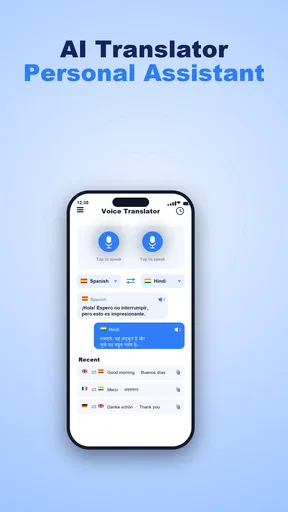
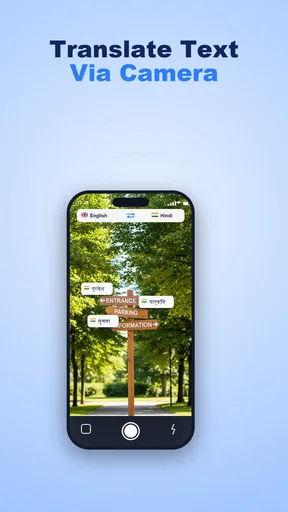
The useful idea behind Voxa is that translation can start with whatever is easiest in the moment. Speaking is natural when you need to ask a question, typing gives you more control over wording, and a camera is handy when the words are already printed on a sign or menu. Having those approaches in one app can reduce the friction of switching between separate tools while you are out and about.
That matters more than it might sound. On a trip, the problem is often not finding a translation service; it is deciding whether to dictate, type, photograph, or copy text while someone is waiting. Voxa’s combination makes it a practical option for short exchanges where speed and convenience matter more than perfect nuance. Its focus on calls, travel, and chat also points toward everyday communication rather than language study.
I’d think of voice translation as the central convenience, with text and camera input as useful alternatives when speaking is inconvenient. A noisy street, a quiet waiting room, or a phrase you want to review before saying it can all change which input makes sense. The app’s value is in giving you more than one route into a translation, not in making those routes equally suitable in every situation.
Choosing the right input for the moment
For a quick spoken question, voice can save time and help when you do not know how to spell a place name or phrase. But spoken language is messy: people trail off, talk over background noise, and use local expressions. If the result looks questionable, switching to text and simplifying the sentence is a sensible fallback. A short, direct question is usually easier to translate reliably than a long explanation with several conditions.
Text is better when exact wording matters or when you have a moment to edit. I’d use it to prepare a question before approaching someone, or to translate a message whose meaning I want to consider rather than answer immediately. The camera route suits text that would be tedious to type, such as a menu item or notice. In either case, the translation should be treated as a helpful draft: proper names, abbreviations, and unusual phrasing deserve an extra check.
A realistic travel use
Imagine arriving at a café and wanting to ask whether a dish contains an ingredient you avoid. A spoken question may be the quickest opening, but this is exactly where I would not accept a fluent-sounding translation as proof that the meaning is precise. I’d keep the question short, use text if I need to make the wording clearer, and show the translated version so the other person can respond or correct my understanding. For a serious allergy, I would use a trusted written explanation as well rather than depend on a phone conversation alone.
Worth Reading Before You Choose

Flipboard Shows What News Apps Must Do Beyond the Feed

Switching to Android Auto Means Rethinking Your Driving Routine

Google Calendar Makes a Crowded Week Easier to Manage

Ludo King Makes the Most of the Minutes Between Plans

Baby Panda World Brings Quick Play to Modern Phones, but Its Game Library Feels Busy

ESPN’s Live Game View Makes Following Close Games Easier
For lower-stakes situations, the workflow is simpler. If a sign is confusing, camera translation can help you identify the general instruction; if you need directions, voice can make the first exchange less cumbersome; if someone sends a short message, text gives you a chance to review it before replying. These are modest tasks, but they are exactly the kind of small interruptions that can make unfamiliar places tiring.
Where it fits among translation options
Compared with using a dictionary, a voice-and-camera translator is more convenient when you need to understand a whole phrase or text quickly. A dictionary is still the better choice when you want to study vocabulary, compare definitions, or understand why a word changes with context. Compared with a general-purpose translator, Voxa’s appeal is its travel-and-chat orientation and its mix of input methods; I would still choose whichever tool I already trust for a long or important exchange.
It also should not be confused with a human interpreter. A translation app can help two people get through a basic interaction, but it may miss politeness, humor, implied meaning, or a crucial distinction. For medical, legal, financial, or safety-critical conversations, I would seek a qualified person or a carefully prepared translation instead. Convenience is valuable, but the cost of misunderstanding changes what counts as good enough.
Practical strengths and honest limits
Voxa is a free Travel & Local app from TRUNG NAM CORPORATION. It is listed for everyone, and its audience includes travelers and people who exchange messages across language barriers. The app has over fifty thousand installs, which suggests it has found a real audience without making popularity a substitute for judging whether its approach suits your needs.
The current release is version 1.0.4, and the app is available for devices running Android 7.0 or later. That makes it accessible to a range of Android phones, though translation comfort will still depend on the device you use and the conditions around you. I would test the input method I expect to use most before relying on it during a busy trip, rather than discovering my preferred workflow in the middle of a conversation.
One practical tip is to reduce a sentence to one idea at a time. Instead of asking a multi-part question with background details, translate the essential request first and follow up after you understand the answer. This is not a special feature; it is a way to make any machine translation easier to interpret. It also gives you a chance to notice when the reply does not match what you meant.
A second useful habit is to choose the input method based on the source, not convenience alone. If a phrase is already printed, camera input can avoid transcription mistakes. If you are unsure what you want to say, typing lets you revise before translating. If speed matters and the surroundings are calm, speaking may be easiest. That small decision can prevent a poor voice recognition result from becoming a poor translation.
There are tradeoffs. Voice is less private than typing if other people can hear you, and it is less dependable when the environment is loud or the speaker talks quickly. Camera translation can struggle with cramped layouts, decorative fonts, glare, or text that is partly hidden. Typed translations take more effort, especially when you are not comfortable with the source language. No single mode removes the need to check the result.
Making a short exchange easier to manage
A useful routine is to decide what you need from the conversation before opening the app. If the goal is simply finding the right platform or confirming a closing time, one concise question is enough; adding a story or several unrelated details makes the result harder to judge. I’d also leave space for the other person to respond in their own words rather than assume that a translated prompt guarantees a clear answer.
For a chat message, I would separate understanding from replying. First translate the incoming text and identify the central point; then draft a brief response and check that it still says what I intend. This two-step approach is slower than firing back immediately, but it helps avoid turning a small ambiguity into a longer misunderstanding. It is especially useful when the message contains a time, meeting place, or request that could be interpreted in more than one way.
On a journey, the camera option can be most useful as a first pass rather than a final reading. I’d use it to locate the relevant line on a notice, then inspect the original wording or ask someone to confirm if the instruction affects where I should go. This matters because a sign may contain several lines, exceptions, or labels, and understanding only the broad subject is not the same as understanding the full instruction.
Questions worth considering before relying on it
Would I use it without an internet connection? I would not plan a trip around that assumption. Before leaving, I’d check how the app behaves in the conditions I expect to face and keep another way to handle essential phrases. The practical lesson is simple: do not wait until you are offline, rushed, or standing at a counter to find out whether your chosen workflow is available.
Does it replace a dedicated translation tool? Not necessarily. If I already have a translator I trust for a particular language pair or task, switching only makes sense when Voxa’s combined voice, text, and camera approach is more convenient. If my need is a single word, a dictionary may be quicker; if I need a carefully reviewed document, a professional service is more appropriate.
Is voice the best choice for every conversation? No. It is useful when hands are occupied or a spoken question is more natural, but it can be awkward in a quiet room, expose private information, or struggle with a noisy setting. I’d keep typed input ready for sensitive wording and use camera translation when the source is already written. The point is to choose the mode that reduces the likely error, not simply the one that takes the fewest taps.
Who gets the most from it
I’d recommend trying Voxa if you travel, handle short multilingual chats, or regularly need to understand signs and brief messages. It is especially appealing if you want voice, typed phrases, and camera translation available in one place instead of repeatedly opening different tools. People who are comfortable treating translations as a starting point, and who can confirm important details with the other person, are likely to get the most practical value from it.
I would skip it as a primary solution if your main goal is structured language learning, precise professional translation, or high-stakes interpretation. A dictionary or course is better for building lasting vocabulary; a human translator is safer when a small wording error could have serious consequences. And if you only need an occasional word, opening a dedicated translator may be just as convenient as adopting another app.
My overall view is that Voxa makes sense as a handy communication tool for everyday travel moments, especially when the best way to ask or understand something changes from one situation to the next. Its strongest idea is that flexibility: speak when you can, type when you need control, and use the camera when the words are already in front of you. Keep your questions short, verify anything important, and it can make small language barriers easier to manage without pretending they disappear.
Pros
- Translates spoken conversations without requiring manual text entry.
- Voice playback helps you hear how translated phrases sound.
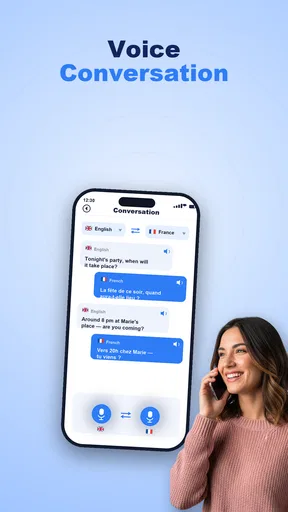
- Chat format makes it easier to follow a back-and-forth conversation.
- Useful for quick
- everyday exchanges while traveling or meeting people.
- Combines voice translation and chat in one app.
Cons
- Translation accuracy can vary with accents
- noise
- and phrasing.
- Some features may require an internet connection.
- Speech recognition may struggle in loud environments.
- Supported languages and features may vary by platform or plan.
- Voice translation can feel awkward for longer or sensitive conversations.
FAQs for Voxa: Voice Translator & Chat
What is Voxa: Voice Translator & Chat used for?
Voxa is designed to help people communicate across language barriers using voice translation and chat features. Depending on the version and permissions available, you can speak or enter a message and use the app to translate it into another language. It may be useful for travel, everyday conversations, or language practice, but translation results can vary and should not be treated as a substitute for a qualified interpreter in important situations.
Which languages does Voxa support, and how accurate are its translations?
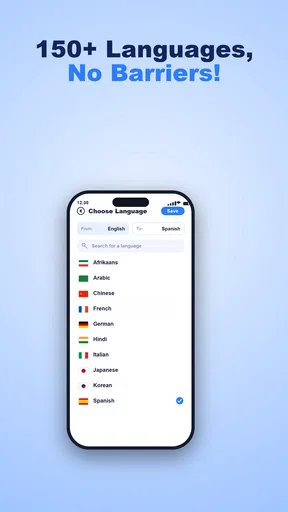
The languages available can depend on the app’s current version and the translation services it uses, so check the language selector and store listing before downloading if you need a particular language. Automated translations are often helpful for basic conversation, but accuracy may decrease with slang, idioms, accents, background noise, or complex sentences. For medical, legal, or other high-stakes communication, verify the translation with a trusted human speaker.
Does Voxa require an internet connection to translate speech or chat?
Many voice-translation and chat apps rely on an internet connection to process speech and provide translations, and offline language support should not be assumed. If you plan to use Voxa while travelling, test the features you need before leaving and check whether any language packs or offline options are offered in the app. Mobile data charges may apply, so Wi-Fi can be preferable when available.
Is Voxa: Voice Translator & Chat free, and are there subscriptions or in-app purchases?
The app’s pricing can vary by platform, region, and current offer. It may be free to install while reserving some features, usage limits, or an ad-free experience for in-app purchases or a subscription. Review the Google Play or Apple App Store listing and the purchase screen before confirming payment. If you start a trial, check its duration and cancellation terms to avoid an unexpected renewal.
What privacy considerations should I know before using Voxa?
Voice translation may require microphone access, and some services process audio or text online. Before using Voxa, review its privacy policy and the permissions requested on your device to understand what information may be collected, processed, or retained. Avoid speaking passwords, financial details, or other sensitive information into any translation app, and use extra caution when translating private conversations or messages involving other people.


